AtlassianPS.Configuration
Open a new issue

A PowerShell community for Atlassian products
Thank you for helping improve AtlassianPS.
You do not need to be an expert to contribute. Small fixes, typo corrections, and docs improvements are all valuable. Every contribution matters, and we are glad you are here.
Tip: Not sure where to begin? Small docs improvements are a great first contribution.
When you notice something that could be improved, tell us by creating an issue.
Each of our projects has an issue tracker where you can report your findings.



BitbucketPS and HipChatPS are archived modules and no longer accept issues or pull requests.
The AtlassianPS coordination repository is not an active module documentation target on this website.
Use their GitHub repositories directly if you need historical source or issue context.
Before creating a new issue, please search open issues first. If a similar issue already exists, add your details there.
No matter if you are fixing a typo or shipping a new feature, changes are submitted through a Pull Request.
Start with Submitting A PR for the full flow. The guide also explains the release and changelog labels required before a pull request can merge.
Our repository includes a “Dev Container” / GitHub Codespaces development container.
Note: A development container (or dev container for short) allows you to use a container as a full-featured development environment. It can be used to run an application, to separate tools, libraries, or runtimes needed for working with a codebase, and to aid in continuous integration and testing.
You can use the devcontainer to spin up a fine-tuned development environment with everything you need for working on AtlassianPS projects.
You can use the devcontainer in your favorite editor or GitHub Codespace.
You can use the links below to get started. The links will trigger VS Code to automatically install the Dev Containers extension if needed, clone the source code into a container volume, and spin up a dev container for use.
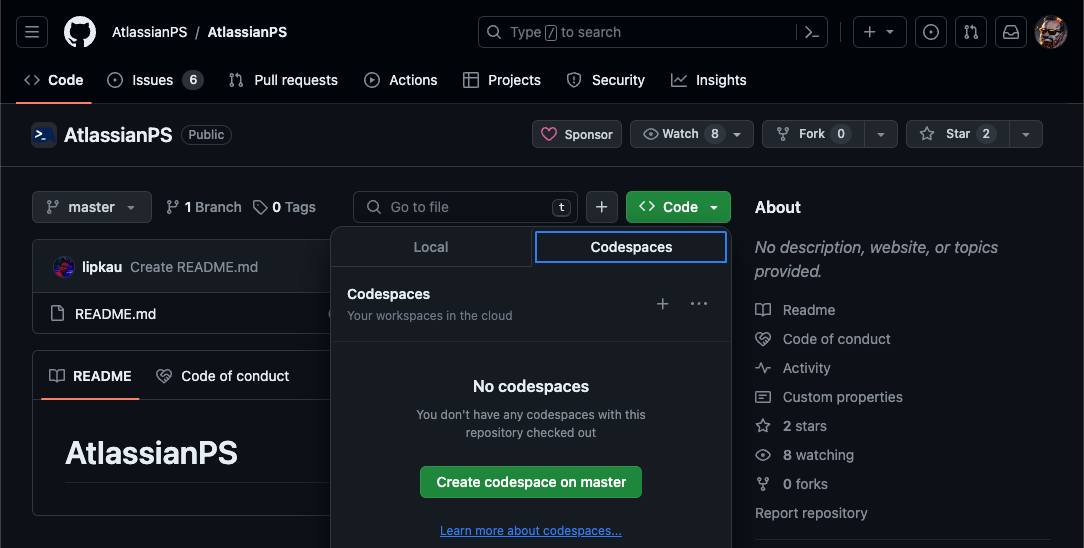
GitHub allows you to spin up a virtual editor (“VS Code in your browser”). You can create your own codespace by navigating to https://github.com/codespaces or by using the “Code” button in the repository itself, as shown below.
Please follow Our Guidelines when contributing code or docs.
The website publishes module documentation from Git submodules.
The main /docs/<Module>/ pages should match the latest released module package, not unreleased branch content.
See Module Documentation Publishing for the submodule policy and docs-only exception rules.